Free Online Photoshop Alternative — Right In Your Browser
Photo Touch-Up is a free online photo editor with layers, masks, AI cutout, curves and filters. No sign-up. No ads. No upload — your photos never leave your device.
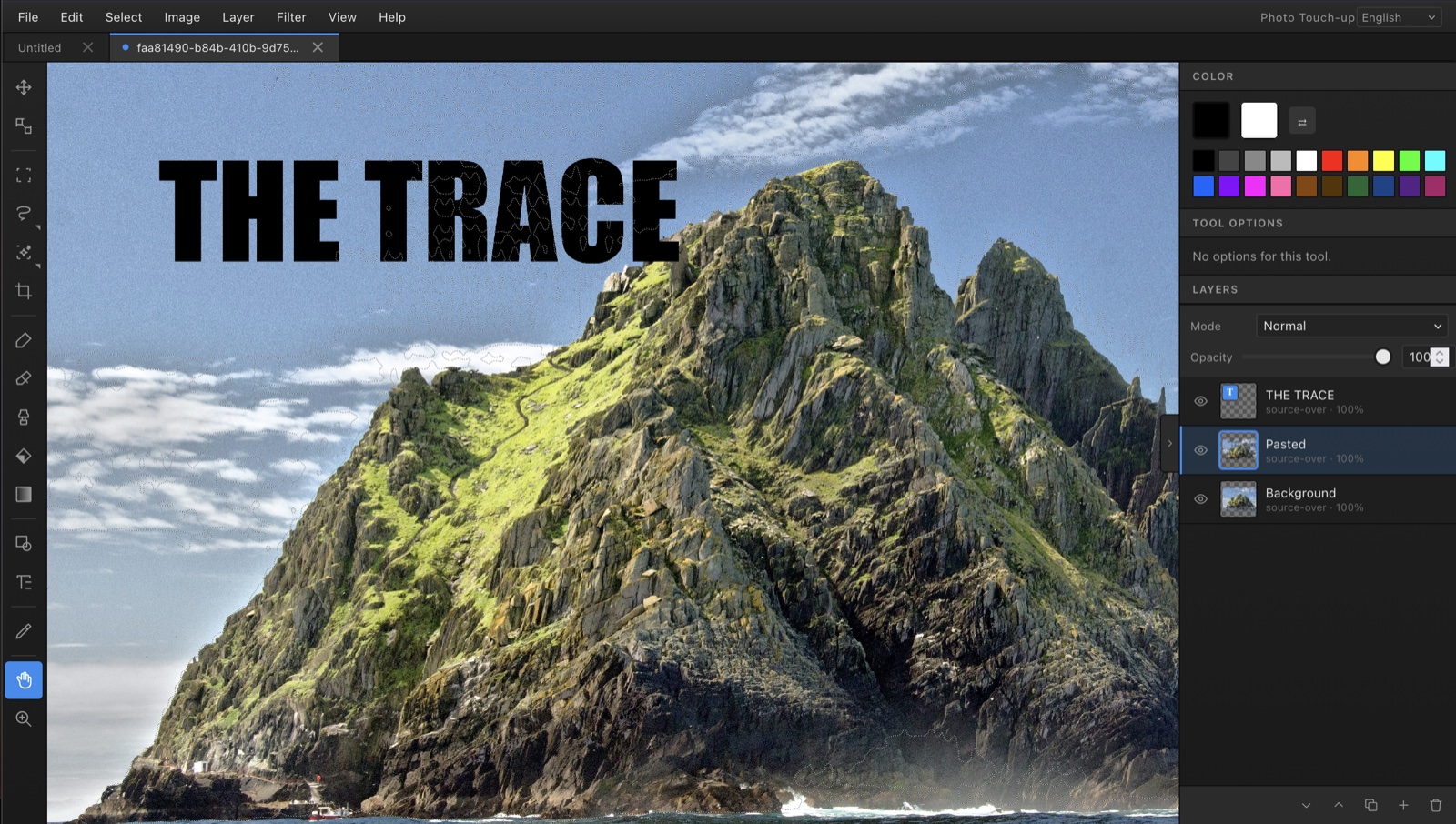
A real photo editor that respects your time and your data.
Most online photo editors push you to a paid plan, plaster ads everywhere, or upload your images to their servers. Photo Touch-Up takes the opposite approach: every pixel is processed locally, every feature is free, and there is nothing to install.
100% free, forever
Every tool, every filter, every feature. No premium tier hiding the good stuff.
Your photos stay private
Editing happens in your browser. Nothing is uploaded, nothing is tracked.
Zero ads, zero pop-ups
A clean canvas, every time. No banners, no upsells, no “sign in to continue”.
Works offline
After the first visit, the editor runs without a network connection.
Fast and lightweight
The whole interface is around 70 KB gzipped. It loads in under a second.
Six languages built in
English, French, Spanish, Portuguese, German and Korean — auto-detected on load.
The Photoshop workflow, distilled.
Everything you reach for in the first hour of any photo edit — layers, selections, brushes, curves, filters, text — without anything you don't need.
Layers & layer masks
Stack images, adjust opacity, blend with 16 composite modes, and paint non-destructive masks.
Smart selections
Marquee, lasso, polygonal lasso, magnetic lasso, magic wand — with Photoshop-style add / subtract / intersect modifiers.
AI subject cutout
Powered by Meta's Segment Anything Model, running entirely in your browser. Click a subject — it's selected.
Curves & levels
Full Bézier curve editor with histogram and per-channel control. Levels with white/grey/black eyedroppers.
Color tools
Color balance, vibrance, photo filter, gradient map, hue/saturation, posterize, auto-tone.
Filters & effects gallery
Blur, sharpen, noise, emboss, edge detection — plus 17 photo presets with live thumbnail preview.
Painting tools
Soft brush, eraser, clone stamp, fill, gradient — all selection-aware so paint stays inside your mask.
Re-editable text
Text layers keep their content, font, size and color. Double-click any time to change them.
Multi-document tabs
Open several images at once, switch between them with tabs, copy and paste between documents.
All the tools in the toolbox
A short list — they're all one keystroke away.
How Photo Touch-Up stacks up.
A quick comparison with the most popular photo editors, focused on the things that matter when you just want to fix a picture.
| Photo Touch-Up | Photoshop | Photopea | GIMP | |
|---|---|---|---|---|
| Price | Free | ~$22/month | Free | Free |
| No account required | Yes | No | Yes | Yes |
| No ads | Yes | Yes | No | Yes |
| No install (runs in browser) | Yes | No | Yes | No |
| Photos stay on your device | Yes | Yes | Yes | Yes |
| Layers & masks | Yes | Yes | Yes | Yes |
| AI subject cutout | Yes | Yes | Yes | No |
| Works offline | Yes | Yes | No | Yes |
| Bundle size | ~70 KB | ~3 GB | ~3 MB | ~300 MB |
Three steps to your first edit.
No tutorial videos, no “getting started” modal. Open the editor and start.
Drop your photo
Drag an image onto the canvas or use File → Open. PNG, JPG and WebP are all supported.
Edit and export
Use the tools, filters, layers and masks. When you're done, File → Export As… with your preferred format and quality.
Things people use Photo Touch-Up for every day.
Remove a background
Use the AI Cutout tool. Click on the subject — the mask is generated locally and added as a layer mask, ready to refine.
Resize a photo for the web
Image → Image Size, type the target width, then File → Export As JPG with the quality slider.
Crop and straighten
The Crop tool offers rule-of-thirds guides. Enter commits, Escape cancels — no destructive surprises.
Adjust color and contrast
Try Curves for total control, or one of the auto-tone / auto-contrast / auto-color commands as a one-click fix.
Apply a filter or preset
Open the Effects Gallery for a thumbnail grid of 17 looks — black & white, warm, cool, vintage, posterise and more.
Add text to an image
Text layers stay editable forever. Pick a font and size, click to place, double-click to re-edit later.
Good questions, honest answers.
Is Photo Touch-Up really free?
Yes — completely free, with no sign-up, no trial period, no premium tier. There are no ads anywhere in the editor. All features (layers, masks, AI cutout, filters, etc.) are available to everyone at no cost.
Do my photos get uploaded to a server?
No. Every edit happens locally in your browser. Your photos never leave your device — there is no upload, no cloud storage, no telemetry on your image content.
Can I use Photo Touch-Up on a phone or tablet?
Yes. The interface adapts to small screens, panels collapse to maximise canvas space, and touch gestures work — including pinch-to-zoom.
Which image formats are supported?
You can open and export PNG, JPG and WebP. AVIF export is available in browsers that support it. The native project format is .touchup — a small JSON file that preserves layers, masks and text.
Does Photo Touch-Up work offline?
Yes. After your first visit, the editor is cached by your browser and works without a network connection. The AI cutout feature needs a one-time model download (~30 MB for the standard tier or ~100 MB for the advanced tier).
How is this different from Photoshop?
Photo Touch-Up runs in any modern browser with no install, no account and no subscription. It covers the core Photoshop workflow — layers, masks, selections, curves, filters, text — without the cost or learning curve. It does not yet support PSD files, layer groups, or vector pen paths.
How is this different from Photopea?
Both run in the browser, but Photo Touch-Up has zero ads, a smaller and faster bundle, and a focus on the most-used touch-up tools rather than full feature parity with Photoshop.